The client is listening live
Source-Connect vs ipDTL vs SessionLinkPRO: what directed sessions do to your sound
Use whichever link the client books; your job is the same either way. Source-Connect is a desktop app and plugin with automatic local backup files; ipDTL and SessionLinkPRO run in a Chromium browser over the Opus codec, with recording built in. What decides how the job sounds is the file recorded on your side, so keep your microphone chain clean and unprocessed, and keep any noise suppression on the talkback call, never on the take.
Vendor pages read: source-elements.com (Source-Connect product and pricing), ipdtl.com (home page; its pricing page returned an error) and sessionlinkpro.com (home and Recording pages). Prices are list prices as read on 18 October 2026 (ipDTL re-read on 26 October 2026).
Which one a client will ask for
You rarely choose. The studio, the director or the agency sends a link or a session time, and you join with whatever they use. That's why the useful question isn't "which is best" but "what do I need on my side for each". Source-Connect describes itself as the industry standard for remote recording, and its Talent tier is aimed squarely at voice-over performers. ipDTL's home page pitches voice sessions alongside broadcast use, including dialling out to a phone number from the same session. SessionLinkPRO calls itself "more than an ISDN replacement": a browser-based far-end recording tool where the host sets up the session and sends guests a link.
Audio path, codec and price, side by side
| Tool | How you join | Audio over the link | Recording and backup | Price and trial |
|---|---|---|---|---|
| Source-Connect 4 | Desktop app or AAX/VST3/AU plugin, macOS and Windows; account login, no iLok | Talent tier: up to 160 kbps per channel, stereo; Studio tier: up to 256 kbps | Your performance records to a local backup file; Auto-Restore fills network dropouts in the studio's take | Talent $35/month or $385/year; Studio $105/month; 15-day trial, no card |
| ipDTL | Web browser: Chrome, Edge or Opera | Opus (wideband, low delay); also iLBC, G.722, G.711; SIP | Multitrack WAV recording in its virtual mixer | From $15 per month (US home page, read 26 October 2026; plan details not readable) |
| SessionLinkPRO | Chromium-based browser (Chrome, Edge, Opera, Chromium) on macOS, Windows, Linux, ChromeOS; host sends a session link | Opus up to 256 kbps mono / 510 kbps stereo, or uncompressed PCM (L16) | Records local or remote signals in the browser, with "disaster recovery" | Price not published where we read; 7-day trial on request |
The best-known side-by-side of these three dates from 2020. Since then Source-Connect moved to version 4 and to account-based licensing, and both browser tools now advertise recording inside the browser. The practical gap between them has narrowed for voice work; the differences that remain are about who installs what, and where the safety copy of your take lives.
Latency and the director's experience
Every link adds delay, and a director feels it as a beat of hesitation before they can say "again". All three vendors describe their audio as low delay or low latency; none publishes a figure we could verify for a home connection, and your internet line matters more than the tool. Two things help in practice. Wear closed headphones so the director's voice never reaches your microphone, and agree a habit for pickups (a slate, a count, or simply waiting for "go") so the delay doesn't cut off your first word.
Local backup recording: why it saves sessions
A take that only exists as a stream is a take at the mercy of the network. Source-Connect's answer is automatic: its Talent tier sends backup data, records your performance to a local file, and the studio's copy is repaired after the take if the connection dropped. SessionLinkPRO says its browser recording includes disaster recovery; ipDTL records multitrack WAV in its own mixer. Whichever is in use, ask one question before the session starts: where is the full-quality copy of my take, and who sends it to whom afterwards?
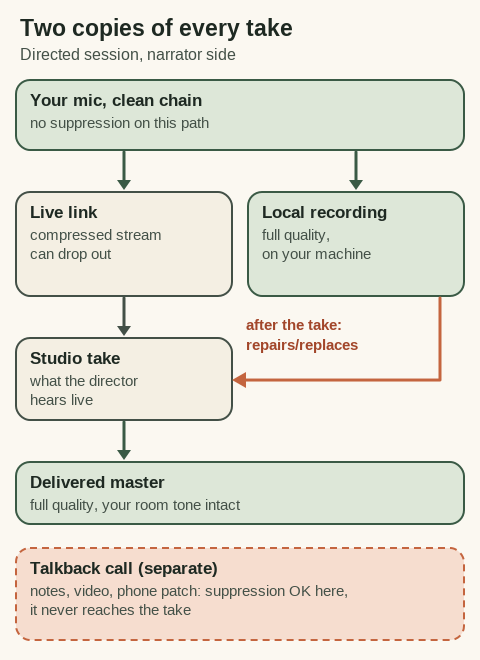
Generalised from Source-Connect's Auto-Restore description and the browser tools' recording features (read 18 Oct 2026). How each tool names and moves the backup differs; the principle doesn't.
Your noise floor on a live link
A link doesn't lower your floor. It carries it. The director hears your room in real time, and a hum you'd have edited around in a self-directed session is now part of the conversation. So the floor work comes first, exactly as in the fix order: measure it, stage your gain, schedule around the noisy hours. Then three link-specific rules:
- No noise suppression on the microphone that feeds the take. The studio wants your natural room tone and an untouched voice. Processing on the record path is baked in for good.
- Check what the browser is doing. Browsers apply their own voice processing to calls by default, and Source Elements' FAQ singles out "aggressive browser audio processing" as a weakness of browser tools. On ipDTL or SessionLinkPRO, ask the host whether processing is off for your input, and listen to a test recording.
- Keep talkback separate. If the client also wants a video call or a phone line for notes, that call is where suppression is welcome, because it never reaches the master.
The night before a first directed session
Most first-session trouble is setup, not sound. Run this once, a day ahead, with the tool the client named:
- Install or update. Source-Connect needs its app or plugin and an account; the browser tools need a current Chromium browser. Do it now, not ten minutes before the call.
- Select inputs by name. Your narration microphone into the session tool, nothing virtual in between. A suppression app's virtual mic on this path is the most common accidental mistake.
- Record a test locally. Thirty seconds, same gain and distance as the job, and read its floor with your usual analyzer. That file is what the studio's backup copy will sound like.
- Agree the file hand-off. Ask whether they want your local recording afterwards, in what format and named how. Write the answer down.
- Check the clock. Measure your floor at the session hour; if it's a loud hour in your house, say so early and offer another slot.
Edge cases
- The client sends a browser link and you're on Safari. Both browser tools name Chromium browsers; install Chrome or Edge before the day, not during it.
- A studio asks you to buy Source-Connect. The 15-day trial needs no card, which is enough for a first booking; the Talent tier is the voice-actor tier in Source Elements' own table.
- The line drops mid-take. Stop, say so, and let the engineer decide. With a local backup running, the take is often fine; without one, re-read.
- Your floor passes at night but the session is at noon. Measure at the session hour. Our 24-hour floor protocol tells you what noon sounds like in your house.
Session questions, answered
- Do I need Source-Connect for voice-over work?
- Only if your clients ask for it. Many studio jobs do; others use browser tools such as ipDTL or SessionLinkPRO, which need nothing installed beyond a Chromium browser. Source-Connect's trial runs 15 days and asks for no card.
- How much is Source-Connect?
- On 18 October 2026 the Talent tier listed $35 a month or $385 a year, the Studio tier $105 a month and the Facility tier $170 a month.
- What codec do ipDTL and SessionLinkPRO use?
- Both use Opus. SessionLinkPRO lists up to 256 kbps mono or 510 kbps stereo, plus uncompressed PCM; ipDTL lists Opus alongside iLBC, G.722 and G.711.
- Should I use noise suppression during a directed session?
- Not on the microphone feeding the take. Fix the room and the gain first, and if you need suppression, use it on a separate talkback call that never reaches the recording.
- What happens if my internet drops during a take?
- With Source-Connect, a local backup file and Auto-Restore repair the studio's copy afterwards. The browser tools record in the browser with their own recovery features. Agree with the engineer before the session who sends which file.